
ICD (iTrans 2.0)
The ITRANS 2.0 software (aka ICD) usage will be mandatory in June 2026 for sending electronic claims.
While previous versions of ITRANS were a simple application, this new iteration is a Windows service and as such, will require assistance from your IT vendor for installation.
This setup is recommended to be done on the server but can be done on any machine. This may also require re-installation of your CDA certificates.
- Download the ITRANS Claim director (ICD) Software for ITRANS 2.0 at https://www.cda-adc.ca/get/
- Uninstall any previous versions of ICA from PC and remove ica.exe from Windows startup from ALL machines
- Run setup choose OK / Next choosing the defaults until you are prompted for the Service User Account and Password.
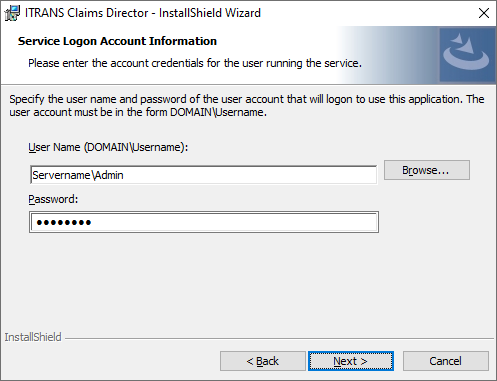
- Select the Windows user that CDA certificates are installed under. If certificates are needed, they can be downloaded from the CDA website. Note that some users may get Error 1920 during the installation. See note below for more information.
- Next will be to identify the ICD folder, which is the iCA folder inside the EDITRACK folder on your server. If installing on your server, this will be the local path (ex. C:\Dental\Tracker\EDITRACK\ICA). Only in situations in which ICD is being installed on the workstation should the full shared path be used (ex. \\NAMEOFYOURSERVER\TrackerServer\EDITRACK\iCA)

- Choose Next to the remaining screens leaving them at their defautls.
- Finish the Install.
If you would like to verify your settings, you may edit the ICD.ini (default location is C:\Program Files (x86)\CDA\ICD) and the following line where you plug in your iCA folder following "ClaimsFolder="
Optional, for Denturist and Hygienist offices: Install the NEW CCDWS (using default paths) The link should be available near the tail end of the installation of ICD. This can also be installed by going to https://cda-adc.ca/get/
Error – 1920
If you encounter this error during instalation, remove the Windows credentials during the installation process. Once installed, you must manually edit the Itrans Claim Director Service and set the login to the same account that has the CDA certificates installed under.
